
Ultrasonic Sensor HC-SR04 and Arduino
In this article we will see how the HC-SR04 ultrasonic sensor works and how to use it with Arduino. This is the most popular sensor for measuring distance. We can use it to build obstacle avoidance robots with Arduino, and that’s what we’ll be doing next.
Description of the HC-SR04 material
The HC-SR04 is an affordable and easy-to-use distance measurement sensor. It has a range from 2 cm to 400 cm. The sensor consists of two ultrasonic transducers. One is a transmitter that emits ultrasonic pulses of sound and the other is a receiver that listens to the reflected waves. It’s basically a SONAR like the ones submarines use.
In the figure below we see the image of the sensor.
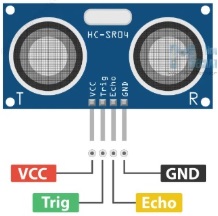
The sensor has 4 pins. VCC and GND go to the 5V and GND pins on the Arduino, and Trig and Echo go to any Arduino digital pin. Using the Trig pin we send the ultrasonic wave from the transmitter and with the Echo pin we receive the reflected signal.
How the HC-SR04 Ultrasonic Distance Sensor Works
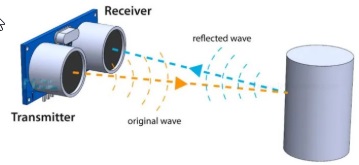
As shown in the image below the sensor emits an ultrasound at 40 000 Hz which travels through the air and if there is an object or obstacle in its path it will be reflected back to the unit. By taking into account the travel time and the speed of sound we can calculate the distance. For this purpose we use the following basic formula to calculate the distance:
D = U x T Distance equal speed times time.
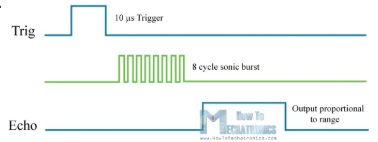
To generate the ultrasound we need to set the Trig pin high for 10 µs. This will send out a group of 8 ultrasound cycles that will travel at the speed of sound. The Echo spike goes up immediately after sending the group of 8 ultrasound cycles and starts listening or waiting for this wave to be reflected by an object. If there is no object or reflected pulse, the Echo pin will time out after 38 ms and return to the low state.
If we receive a reflected pulse, the Echo pin will fall earlier than this 38ms. Depending on the time the Echo pin was HIGH, we can determine the distance the sound wave traveled, thus the distance from the sensor to the object.
The diagram below shows the function we described.
We actually know both the speed and time values. Time is the time the Echo pin was HIGH and velocity is the speed of sound which is 340 m/s. There is one extra step we need to do, and that is to divide the final result by 2. We need to do this because we are measuring how long it takes the sound wave to travel to the object and reflect back. Assume the Echo pin was HIGH for 2 ms. If we want to express the result of the distance in cm, we can convert the value of the speed of sound from 340m/s to 34cm/ms.
So if the Echo pin was HIGH for 2ms (which we measure using the pulseIn() function for the Arduino, the distance from the sensor to the object is 34cm.
D = (U x T) / 2 = (34cm/ms x 2ms) / 2 = 34cm.
How to connect HC-SR04 ultrasonic sensor to Arduino
The connection of the Arduino Uno with the distance sensor is shown in the figure below.
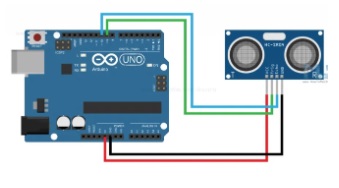
The GRD and VCC pins of the module must be connected to the ground and 5V pins on the Arduino board respectively, and the trig and echo pins to any Digital I/O pin on the Arduino board.
Arduino code for the HC-SR04 ultrasonic sensor
/*
Ultrasonic Sensor HC-SR04 and Arduino Tutorial
by Dejan Nedelkovski,
www.HowToMechatronics.com
*/

// defines pins numbers
const int trigPin = 9;
const int echoPin = 10;

// defines variables
long duration;
int distance;

void setup() {
pinMode(trigPin, OUTPUT); // Sets the trigPin as an Output
pinMode(echoPin, INPUT); // Sets the echoPin as an Input
Serial.begin(9600); // Starts the serial communication
}

void loop() {
// Clears the trigPin
digitalWrite(trigPin, LOW);
delayMicroseconds(2);

// Sets the trigPin on HIGH state for 10 micro seconds
digitalWrite(trigPin, HIGH);
delayMicroseconds(10);
digitalWrite(trigPin, LOW);

// Reads the echoPin, returns the sound wave travel time in microseconds
duration = pulseIn(echoPin, HIGH);

// Calculating the distance

distance = duration * 0.034 / 2;

// Prints the distance on the Serial Monitor
Serial.print("Distance: ");
Serial.println(distance);
delay(500);
}
Explanation of the code
First we need to define the Trig and Echo pins. In this case they are pins number 9 and 10 on the Arduino board and I call them trigPin and echoPin. We need a Long variable called “duration” for the travel time we will get from the sensor and an integer variable for the distance “distance”.
// defines pins numbers
const int trigPin = 9;
const int echoPin = 10;

// defines variables
long duration;
long distance;

In the setup we need to set trigPin as output and echoPin as input and also start serial communication to display the results on the screen.

void setup() {
pinMode(trigPin, OUTPUT); // Sets the trigPin as an Output
pinMode(echoPin, INPUT); // Sets the echoPin as an Input
Serial.begin(9600); // Starts the serial communication
}

In the loop() loop we first need to make sure trigPin is clear, so we need to set this pin to LOW state for 2 µs. Now to generate the Ultra sound wave we need to set the trigPin to HIGH state for 10 µs.

// Clears the trigPin
digitalWrite(trigPin, LOW);
delayMicroseconds(2);

// Sets the trigPin on HIGH state for 10 micro seconds
digitalWrite(trigPin, HIGH);
delayMicroseconds(10);
digitalWrite(trigPin, LOW);

Using the pulseIn() function we read the travel time and put that value into the 'duration' variable. This function has 2 parameters, the first is the name of the Echo pin and the second is the state of the pulse we are reading, either High or Low.

// Reads the echoPin, returns the sound wave travel time in microseconds
duration = pulseIn(echoPin, HIGH);

In this case, we need this set to HIGH, as the HC-SR04 sensors set the Echo pin to High after the transmitter sends the 8-cycle ultrasonic burst. This essentially starts the timing and once we receive the reflected sound wave the Echo pin will go Low which stops the timing. Finally the function will return the pulse length in microseconds.

To get the distance we will multiply the duration by 0.034 and divide it by 2 as we explained this equation earlier.

// Reads the echoPin, returns the sound wave travel time in microseconds
duration = pulseIn(echoPin, HIGH);

// Calculating the distance
distance = duration * 0.034 / 2;
Στο τέλος θα εκτυπώσουμε την τιμή της απόστασης στην οθόνη.

The information I quoted I got mainly from the site

https://howtomechatronics.com/tutorials/arduino/ultrasonic-sensor-hc-sr04/